Playslip Setup Troubleshooter
Before using this troubleshooter, please make sure you are using the most recent version of Lotto Sorcerer*
*Version 9.3 for version 9 users, 8.9 for version 8 users, version 7.9 for version 7 users, or version 6.34 for version 6 users.
Tips
- Lotto Sorcerer prints the marks using the coordinates from the left and top edges of the paper. So the playslip needs to loaded with the first number of the first game fed into the paper first, and as far left as you normally print.
- When printing, we recommend that you do not setup a special paper size to reflect the size of the playslip: just let the printer "think" it is a normal sheet of paper (either 8-1/2"x11" or A4).
Before You Start Troubleshooting...
Before you begin using this Troubleshooter, make sure you have run the Test Printer function (Lotto Sorcerer menu item "Utilities > Playslips > Test Printer...") to see if your printer is even capable of printing to the playslips.
Next, print out a playslip by using the "Test Print" button in the final page of the Playslip Setup Wizard. Then, answer the following questions in this and following web pages.
Start Troubleshooting...
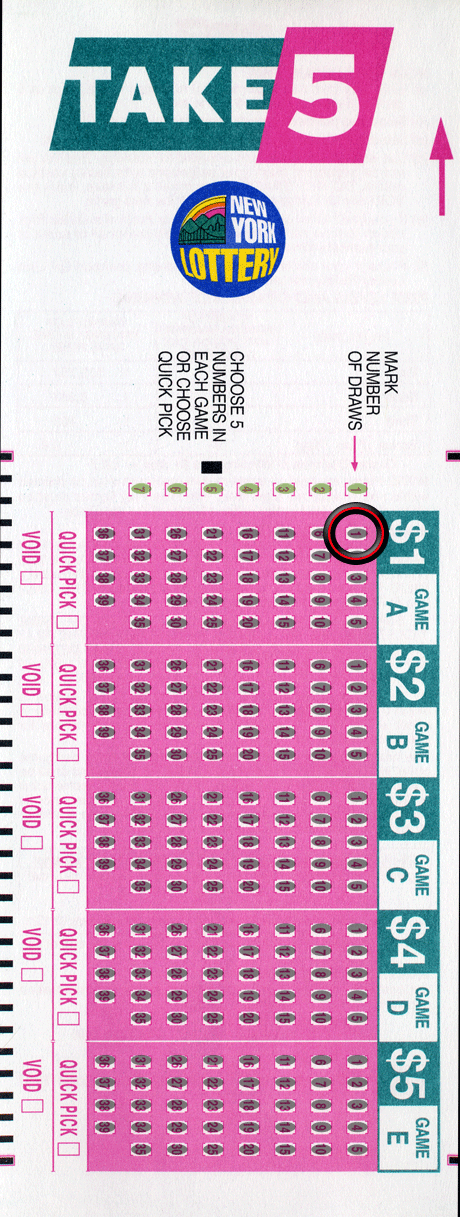
Check the first mark of the first board on the playslip. Is it OK?
- Yes
- No